To invite a participant to a cohort you manage, visit the cohort page (left menu > Cohorts > Name of your cohort).
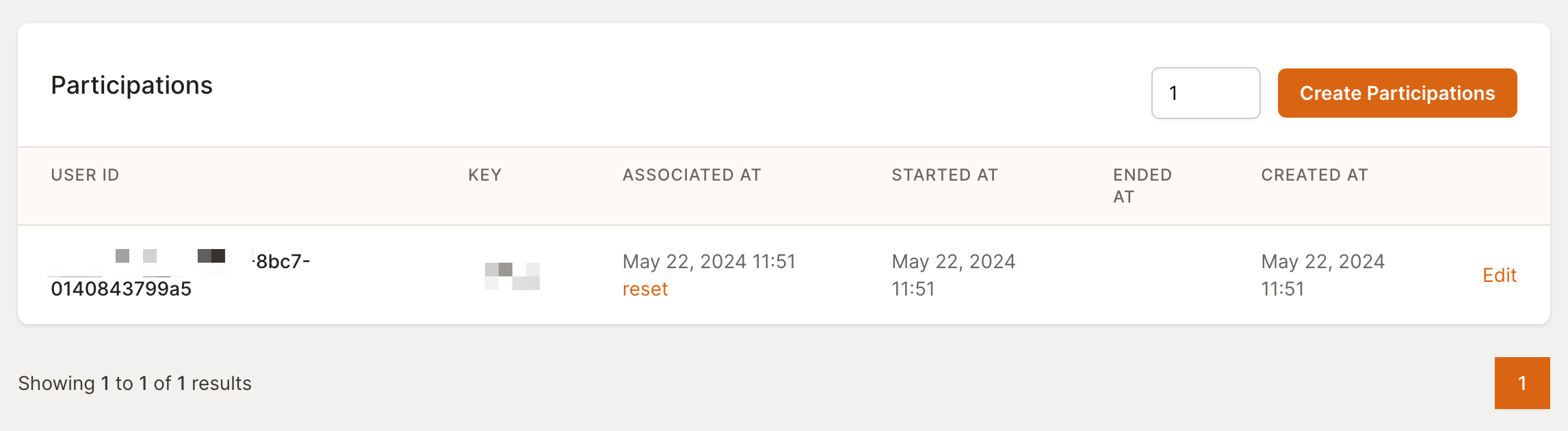
Enter the number of “Participation” tokens you want to create and click “Create Participations.” The new participations will be added to the Participations table. Once created, you can share each new participation token with a user, by email or any other means.
As MyFoodRepo doesn’t store any participant emails, it is the responsibility of the cohort manager to keep a list of participation token/user email associations. If a user changes devices or logs out, you’ll have to reset the correct participation token to allow them to sign in again to the MyFoodRepo mobile app.
Participations can be edited to add an end date. Once this end date is reached, the participation will stop, and the user won’t be able to capture any new dishes.
If a user logs out or changes their device, they won’t be able to log in again with the same token. They should contact the cohort manager. Once the user’s identity is verified, the manager can reset the participation using the “reset” link in the Participations table.
A reset does not generate a new participation key. It clears the participation’s “associated” state and invalidates the user’s existing mobile-app authentication tokens, so the same key can be re-used by the user to sign in again on a new device. The cohort manager keeps the same key on file.
